
યુએસ શેર ટ્રેડિંગ
Binance પર શેર કેવી રીતે ખરીદવા: USDC થી યુએસ શેર ખરીદવાનાં પગલાં
Binance પર US stocks ખરીદવા પહેલાં India eligibility અને Direct Stocks ઓળખો; પછી USDC, Market/Limit, fractional shares, Preview, fill અને balance ના પગલાં પૂર્ણ કરો.
આ લેખ how to buy stocks on Binance માટે ઓર્ડર મૂકવાની પ્રક્રિયા સમજાવે છે; તેને રોકાણ સલાહ ન ગણશો. Interface, minimum, ઉપલબ્ધ securities, order validity અને sessions બદલાઈ શકે છે. તમારા ખાતાની order/confirmation screen અંતિમ આધાર છે.
આ લેખનો હેતુ તમે પહેલેથી પસંદ કરેલા Direct Stocks order ને product page થી અંતિમ status સુધી પહોંચાડવાનો અને પછી shares તથા funds નો હિસાબ મેળવવાનો છે. શું ખરીદવું અને કેટલો જોખમ લેવો તે પહેલાં → First-order checklist માં નક્કી કરો.
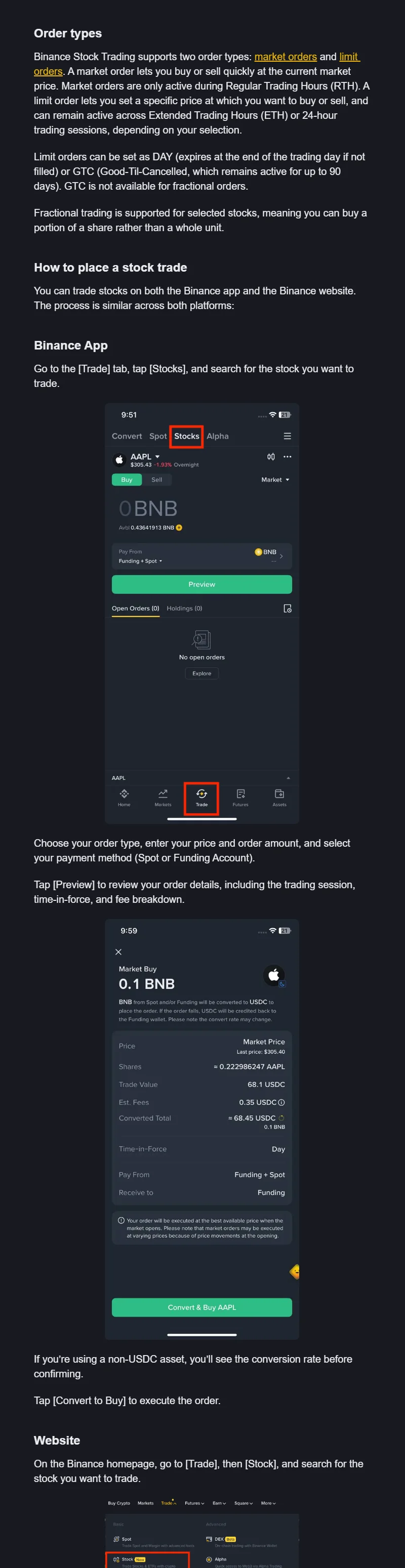
Binance Academy ની સત્તાવાર Stocks માર્ગદર્શિકાનું વાસ્તવિક order interface; તેનો ઉપયોગ fields અને પ્રક્રિયા સમજવા માટે જ કરો. સ્રોત: Binance Academy; screenshot: 2026-08.
ઓર્ડર પહેલાં જરૂરી વિગતો લખી લો
Ticker, product type, Buy/Sell, મહત્તમ ખર્ચ, હાલનો session, Market/Limit, share/amount mode, limit price, debit account અને પુરાવા રાખવાનું સ્થાન લખો. સાથે આ પણ તપાસો:
- તમારા સાચા રહેઠાણવાળા account માં Stocks entry દેખાય અને KYC તથા security પૂર્ણ હોય.
- Usable USDC order page જે Funding/Spot account માંથી debit કરે ત્યાં; auto-conversion સમજાયેલી.
- bStock/stock perpetual નથી અને current Product Terms વાંચેલા.
- Market, Limit અને fractional restriction સમજાયેલી; estimate ને fill guarantee ન માનેલી.
કોઈ માહિતી ખૂટે તો ઓર્ડરની તૈયારી ત્યાં જ રોકો. Funding માટે → INR→USDC અને Direct Stocks ના અધિકારો માટે → Binance Stocks structure જુઓ.
ભારતમાં પાત્રતા અને Direct Stocks ની ઓળખ તપાસો
પગલું 1: Trade → Stocks અથવા હાલની સમકક્ષ entry ખોલો. Search ad, DM અથવા બહારના “agent” ની login link વાપરશો નહીં.
પગલું 2: Company name અથવા ticker શોધો. પૂરું નામ, ticker, exchange અને product label મેળવો. Leverage, funding rate, perpetual અથવા bStock/token લખેલું હોય તો અટકો—આ પ્રક્રિયા Direct Stocks માટે છે.
પગલું 3: હાલના fields વાંચો. Bid, ask, last price અને timestamp લખો. Last price અગાઉના સોદાનો ભાવ છે; Market buy એ જ ભાવે ભરાશે તેની ખાતરી નથી. Session અને fractional shares ઉપલબ્ધ છે કે નહીં તે પણ જુઓ.
પગલું 4: Buy/Sell બાજુ ખાતરી કરો. Holding ઘટાડવી હોય તો Sell પસંદ કરવું પડે; માત્ર button ના રંગ પરથી નિર્ણય ન લો.
સત્ર અને ઓર્ડરનો પ્રકાર પસંદ કરો: Market કે Limit
Binance ની હાલની માર્ગદર્શિકા Regular, Extended અને Overnight/24-hour sessions બતાવે છે; દરેક security માટે બધા sessions ઉપલબ્ધ નથી. Market order માત્ર Regular Trading Hours માં active છે; Limit order તમારા account ની હાલની screen મુજબ બીજા supported sessions માં મૂકી શકાય છે.
| Option | તમે શું control કરો | શું guarantee નથી |
|---|---|---|
| Market | Available market price પર faster execution | Fill price; last price guarantee નહીં |
| Buy Limit | Limit અથવા નીચે buy | Fill/instant fill |
| Sell Limit | Limit અથવા ઉપર sell | Fill |
| DAY | Platform-defined trading day સુધી | Next day carry |
| GTC | Current guide મુજબ up to 90 days | Forever; fractional માં GTC નથી |
Session બદલાય, quote stale, bid/ask spread unacceptable અથવા validity સમજાતી ન હોય તો stop. Investor.gov પણ Market ને price guarantee વગર execution અને Limit ને fill guarantee વગર price control કહે છે.
રકમ, શેરની સંખ્યા અને અંશ-શેરનાં ખાનાં ચકાસો
Amount mode માં currency amount ભરો અને system અંદાજિત shares બતાવે; share mode માં whole અથવા fractional quantity ભરો. કોઈ એક mode હંમેશા વધુ સુરક્ષિત નથી. Unit અને અંદાજિત કુલ ખર્ચ સાથે વાંચવો જરૂરી છે.
Official guide fractional selected securities માટે કહે છે અને fractional order માટે GTC unavailable બતાવે છે. SEC investor material પ્રમાણે broker દ્વારા security, session, order type, voting, liquidity અને transfer restrictions બદલાય છે. 0.1 share buy થાય એટલે whole-share rights exact same assume ન કરો.
Input પછી ત્રણ checks:
- Field unit USDC/amount છે કે shares?
- Estimated shares × reference price અંદાજે stock amount જેટલું છે?
- Estimated total cash cap નીચે છે અને displayed fee/conversion માટે room છે?
“100” amount mode માં લગભગ 100 USDC હોઈ શકે; share mode માં 100 shares. Memory નહીં, unit અને confirmation જુઓ.
Preview page પર ઓર્ડરની અંતિમ તપાસ કરો
Preview/Review પછી order card માં લખો:
| Field | Verify |
|---|---|
| Product | Company/ETF, ticker, exchange, Stocks product |
| Side | Buy/Sell |
| Session | Regular/Extended/Overnight order સાથે compatible |
| Order | Market/Limit, DAY/GTC જો દેખાય |
| Quantity | Amount/share unit, decimal, estimated shares |
| Price | Limit અથવા bid/ask/estimated execution |
| Funding | Debit account, USDC/auto-converted asset |
| Cost | Displayed fee, ADR/other fee, estimated total debit |
Requote, fee change અથવા session switch થાય તો affected fields ફરી વાંચો. Old fixed fee ને order evidence ન માનો; current preview executable input છે.
ઓર્ડર મોકલ્યા પછી status મુજબ પગલું લો
Submit પછી Orders/History ખોલીને order ID રાખો:
- Open/Pending: હજી fill થઈ શકે; duplicate નહીં.
- Partially filled: Filled quantity, average price, remaining લખો; remaining હજી execute થઈ શકે.
- Filled: Final shares, average fill, fee, debited asset, time લખો.
- Cancelled/Expired: Partial fill zero છે કે નહીં તપાસો; partial હોય તો “nothing bought” નહીં.
- Rejected: Eligibility, balance, session, minimum, price precision reason વાંચો.
Unfilled remainder cancel કરવી હોય તો official Cancel entry અને final status verify કરો. “Mistake offset” માટે તરત reverse Market order ન મોકલો; original fill પહેલાં નક્કી કરો.
Shares અને funds નો હિસાબ મળે ત્યારે પ્રક્રિયા પૂર્ણ થાય
Status final પછી:
Opening shares + actual buy − actual sell = closing shares
Opening funds − actual stock debit − displayed fees ± unused conversion/refund = closing funds
Order confirmation, fills, Funding/Spot balance, holding screen અને conversion record રાખો. Fractional quantity full precision માં રાખો; own ledger માં વહેલી rounding નહીં.
પ્રક્રિયા પૂર્ણ ગણાય જ્યારે status અંતિમ હોય અથવા બાકી open quantity જાણી-સમજી રાખેલી હોય; holding અને funds નો હિસાબ મળે; fees/conversion નોંધાયેલા હોય; અને order ID મૂળ પુરાવા સાથે જોડાયેલો હોય. પાંચેય બાબતો જરૂરી છે.
ભૂલ આવે ત્યારે શું કરવું અને ક્યારે અટકવું
Balance છતાં reject: Correct account, fee buffer, supported auto-conversion જુઓ. Limit pending: Open status, trigger price, session અને DAY/GTC validity જુઓ. Holding delay: Order History first; refresh, duplicate નહીં. Estimate mismatch: Market/Limit, partial fills, spread, fee, conversion જુઓ.
આ સ્થિતિમાં અટકો: product ની ઓળખ સ્પષ્ટ ન હોય; VPN જરૂરી પડે; fee અથવા debit asset સમજાવી ન શકાય; platform બહાર payment માગે; quote timestamp ન હોય; unit સ્પષ્ટ ન હોય; અથવા status, holding અને balance મેળ ન ખાતા હોય. પુરાવા રાખીને સત્તાવાર support case બનાવો.
Fraction બીજી brokerage ને transfer? General rule પરથી નહીં. SEC કહે છે fractional shares સામાન્ય રીતે non-transferable હોઈ શકે; actual Stocks agreement/function તપાસો.
GTC forever? નહીં. Current guide up to 90 days કહે છે અને fractional GTC નથી; account screen stricter હોય તો screen માનવી.
Sell flow same? Fields similar, પરંતુ sellable quantity, tax event, session, limit અને proceeds account ફરી તપાસો.
Fill પછી → Fee calculation અને → Dividend/corporate actions સાથે long-term record પૂરો કરો.
સત્તાવાર સ્ત્રોતો અને ચકાસણી
પ્રાથમિક સ્રોતો 2026-08-24 ના રોજ તપાસવામાં આવ્યા હતા. Interface, securities list, minimum, validity અને fractional-share rules બદલાઈ શકે છે; હાલનું order page મુખ્ય આધાર છે.